
How to Integrate AI Into Existing Business Software Without Rebuilding Everything
Add Smart Features to the Tools Already in Use
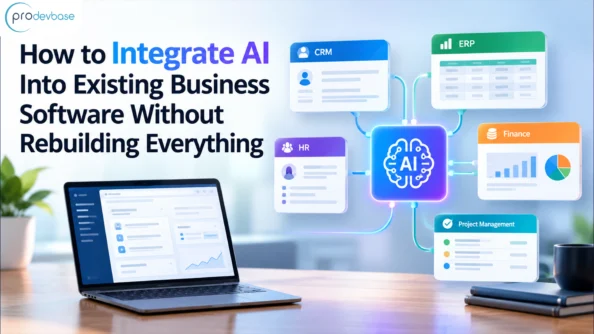
AI integration into existing business software helps businesses add intelligent features to the tools they already use without rebuilding everything from scratch. By connecting AI tools with existing applications, companies can automate repetitive tasks, improve decision-making, and make their workflows more efficient while keeping their core software in place.
Why AI Business Software Integration Doesn’t Require a Full Rebuild
It is a common belief among leaders that adopting AI means having to start from scratch. Fortunately, this is not the case. Businesses can incorporate AI into their existing software by following a clear, step-by-step approach because their current tools already contain the data and workflows AI needs.
A core system rebuild creates risks because it can take years and cost millions while customers still need daily service. can take years and cost millions, even though customers still need the service every day. As a result, many rebuild projects stall before they produce anything useful. In the meantime, the budgets get smaller, and the teams lose patience.
Integration follows a more relaxed approach by having teams link AI services to the software that they already trust. This method leads to quicker results and ensures that staff remain productive. Even better, teams can run small-scale tests to demonstrate value before spending large amounts of money. Prodevbase provides AI services that help businesses take this route without disrupting their daily work.
How AI Business Software Integration Connects to Legacy Systems
Businesses can integrate AI into existing software through APIs, middleware, plugins, and robotic process automation (RPA). These methods allow AI tools to connect with existing applications, exchange data, and automate tasks without requiring a complete system rebuild.
Even those systems that do not have modern APIs can take part; database connectors and scheduled file exports can be used to transfer the data. In other instances, robotic process automation copies the information from one screen to another. Although these methods are not very attractive, they do work.
Where to Start Your AI Journey
Begin by carrying out a repetitive task, for example, sorting support tickets. Then determine if clean data is available for that task. Following this, select a metric, such as the number of hours saved or the number of errors reduced. At that point, the results will speak for themselves and help you secure support for the next project.
Suppose a company is using an ERP system that is ten years old; replacing that system would require stopping operations for several months. By contrast, adding an AI-based forecasting module on top of it can be done in just weeks.
Key Benefits of Adding AI to Current Software
- The cost is lower – since the existing licenses and infrastructure remain rather than being replaced.
- Launching more quickly – instead of taking years, small integrations are often put into use within weeks.
- There will be less disruption – since the teams continue to use the screens they are used to as the new features are introduced bit by bit.
- AI can make better decisions – by turning stored data into forecasts, alerts, and specific recommendations.
- The level of productivity increases – because automation takes over routine tasks, allowing the workers to concentrate on those tasks which require judgment.
- It’s easy to scale – new AI features can be added individually as our needs grow.
Also read: From Data Chaos to Smart Operations: Building a Reliable Foundation for AI in Manufacturing
Practical Use Cases for AI Integration
Smart software is available for use by all departments, but the most effective outcomes are achieved through targeted projects that have definite objectives. The following six examples work with existing systems and deliver measurable results without replacing the main platform.
- In a CRM – an AI assistant helps agents by drafting responses and providing summaries of the lengthy ticket histories.
- In accounting software – AI can read scanned invoices, extract the key fields, and identify any unusual amounts.
- In inventory software – the predictive models used examine previous sales figures and recommend improved reorder levels.
- In marketing platforms – AI is used to rank new leads according to how likely they are to make a purchase, enabling sales teams to contact the most promising prospects first.
- In the process of resume screening using HR systems – artificial intelligence matches applicants to the job requirements and enables recruiters to save hours of review.
- In payment systems – artificial intelligence can identify suspicious patterns in real time and notifies the finance team.
Step-by-Step Process to Integrate AI Into Existing Business Software
Successful AI integration into existing business software starts with identifying business needs, preparing reliable data, choosing the right integration method, and testing the solution before scaling it across the organization.
Step 1 –Audit Existing Systems for AI Business Software Integration
you should carry out an audit of the existing systems. To do this, make a list of the software, data sources, and workflows that are currently being used, and then identify which of the tools provide APIs. This audit helps you identify gaps and quick wins early.
Step 2 –Choose the Right Use Case for AI Integration
you should select one specific use case that has a large impact. Choose a task which is repetitive, measurable, and carries low risk; the project will be completed quickly since its scope is small.
Step 3 – Prepare Data for AI Business Software Integration
You must prepare and clean the data because AI performance depends on data quality. Remove duplicates, correct errors, and establish clear access rules. Cleaning the data also leads to greater accuracy.
Step 4 –Select an Integration Method
you need to select an integration method by choosing between using an API, employing middleware, or using a ready-made plugin. For instance, a cloud AI service is usually appropriate for teams that do not have a large technical staff.
Step 5 – Build and Test a Pilot
construct a pilot and test it by releasing the feature to a small number of users, while at the same time collecting feedback and monitoring the selected metric. The pilot should be kept brief, with a duration of four to six weeks.
Step 6 – Monitor, improve and scale.
Once the pilot has been successful, check each month on accuracy, security, and adoption. Next, use the same approach with other teams. Carrying out regular reviews ensures that the solution remains reliable over time.
Tools and Technologies That Make Integration Easier
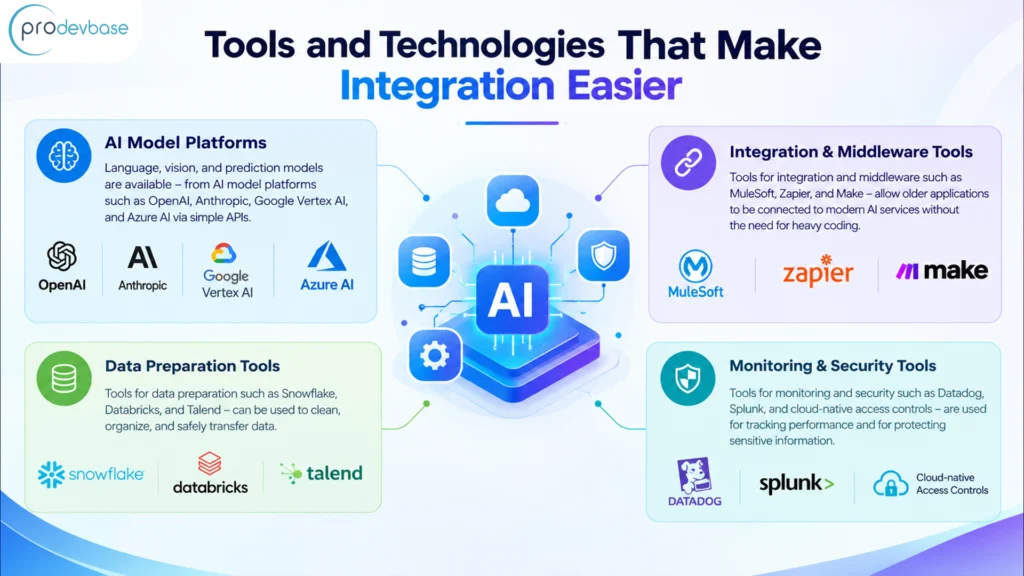
You don’t need to build each component from scratch. Well-developed tools support every stage, and free trials often let teams test their options before making a purchase.
- Language, vision, and prediction models are available – from AI model platforms such as OpenAI, Anthropic, Google Vertex AI, and Azure AI via simple APIs.
- Tools for integration and middleware such as MuleSoft, Zapier, and Make – allow older applications to be connected to modern AI services without the need for heavy coding.
- Tools for data preparation such as Snowflake, Databricks, and Talend – can be used to clean, organise, and safely transfer data.
- Tools for monitoring and security such as Datadog, Splunk, and cloud-native access controls – are used for tracking performance and for protecting sensitive information.
The tools you select will be determined by your budget, the skills of your team, and the technologies you already have in place. That said, an experienced partner can assist you in evaluating the different options and help you steer clear of expensive errors. Prodevbase offers AI services which include integration planning, custom development, and continuous support. Just as important is having a robust system of governance to ensure that AI is used in a safe, fair, and compliant manner. Security should also be given consideration; hence, you should restrict data access and check the vendor’s privacy policies before linking any tool to your system. If you have the proper foundation, your team can then innovate with confidence.
Willing to incorporate AI into your current business software?
Never let an outdated system hinder your business from growing. Give our experts a call now to discover the fastest way to incorporate AI into your existing tools. The earlier the work starts, the sooner the savings will begin.
Conclusion
Businesses can incorporate AI into their current software without replacing the systems they already use. You should start with small-scale projects, use clean data, and assess all the results. After that, expand the initiatives that have proven themselves worthwhile. Doing so also protects the money your business has already invested in software and training. Ultimately, businesses can lower costs, reduce risks, and make progress faster than competitors who wait for a complete rebuild.
Prodevbase provides AI integration, software modernization, and automation services tailored to your business requirements. Get in touch with us now to arrange a free consultation and take the first step towards smarter software.
Follow us on our LinkedIn Platform