
How to Connect Multiple Business Systems Using AI Agents
How to Build an AI Customer Support Agent That Resolves Requests Faster
How AI Agents Connect Disconnected Business Applications
Modern businesses use different software platforms to manage sales, finance, customer support, HR, and daily operations. However, these applications often work independently. Employees must switch between systems, transfer information manually, and coordinate tasks across departments. So let’s know more about How to Build an AI Customer Support Agent.
This creates delays, duplicate data, and unnecessary manual work.
AI agents offer a smarter way to connect these applications. They can retrieve information, understand business requests, coordinate tasks, and perform approved actions across multiple systems.
By combining AI capabilities with APIs and enterprise integrations, businesses can create connected workflows that reduce repetitive work and improve operational efficiency.
At ProDevBase, we help businesses explore custom AI agents and intelligent automation solutions designed around their existing systems and business goals.
What Does Connecting Business Systems Using AI Agents Mean?
Connecting business systems using AI agents means enabling intelligent software agents to interact with multiple applications and coordinate tasks between them.
Traditional integrations usually follow predefined rules to transfer information between applications. AI agents can go further by interpreting requests, selecting appropriate tools, and managing multi-step workflows.
For example, when a customer places an order, an AI agent could retrieve customer details from a CRM, check product availability in an inventory system, send order information to an ERP platform, and prepare an invoice through an accounting application.
Instead of employees manually coordinating each step, the agent manages the workflow within its assigned permissions and requests human approval when necessary.
Why Do Businesses Need AI Agents to Connect Multiple Systems?
Disconnected applications create challenges that affect productivity and business performance.
- Manual data entry: Employees repeatedly enter the same information into different platforms, increasing workload and errors.
- Delayed workflows: Tasks involving multiple departments take longer when information must be transferred manually.
- Limited visibility: Important business data remains scattered across different applications.
- Repetitive coordination: Teams spend time checking records, sending updates, and following up on routine tasks.
- Slower decisions: Employees must collect information from several systems before understanding a business situation.
AI agents can help address these problems by connecting applications and coordinating tasks through automated workflows.
How AI Agents Connect Different Business Systems
A successful AI agent integration requires several components working together.
1. Business Applications and Data Sources
First, identify the systems that need to communicate. These may include CRM platforms such as Salesforce, ERP systems such as SAP, HR applications such as Workday, and customer support tools such as ServiceNow.
Each application provides information that may be useful to other departments.
2. APIs and Integration Connectors
APIs allow applications to exchange information and perform authorized actions. AI agents use these connections to retrieve records, update information, and trigger workflows.
For example, an agent can retrieve a customer record from a CRM and check invoice information through an accounting system.
3. AI Agent Orchestration
The orchestration layer manages how agents receive instructions, select tools, and coordinate tasks.
For complex workflows, multiple specialized agents can work together. One agent may handle customer requests, another may check inventory, and a third may coordinate order updates.
Frameworks such as LangGraph, AutoGen, and CrewAI can support the development of these agent-based workflows.
4. Security and Human Approval
Agents should only access information and perform actions permitted by their assigned roles. Businesses should implement authentication, access controls, audit logs, and approval processes for sensitive activities such as payments, refunds, and financial record changes.
Practical Use Cases of AI Agents Across Business Systems
AI agents can connect different applications to support everyday business operations.
1. Sales and CRM Automation
An AI agent can retrieve new lead information, check existing CRM records, assign leads to sales representatives, and prepare follow-up tasks. This helps sales teams respond faster and reduces repetitive administrative work.
2. Finance and Accounting
AI agents can retrieve purchase orders from ERP systems, compare them with invoices, identify discrepancies, and send records for finance approval. Once approved, the workflow can update the accounting platform.
3. HR and Employee Management
During employee onboarding, an agent can prepare checklists, create employee records, request documents, and notify the IT department to arrange system access.
4. Customer Support and Order Management
An AI agent can retrieve customer details, check order status, review payment information, and prepare responses using data from connected applications. Requests involving refunds or account changes can be sent for human approval.
5. Inventory and Supply Chain Management
AI agents can monitor stock levels, retrieve sales information, and prepare purchase recommendations when inventory falls below defined thresholds. This helps businesses coordinate inventory and procurement activities.
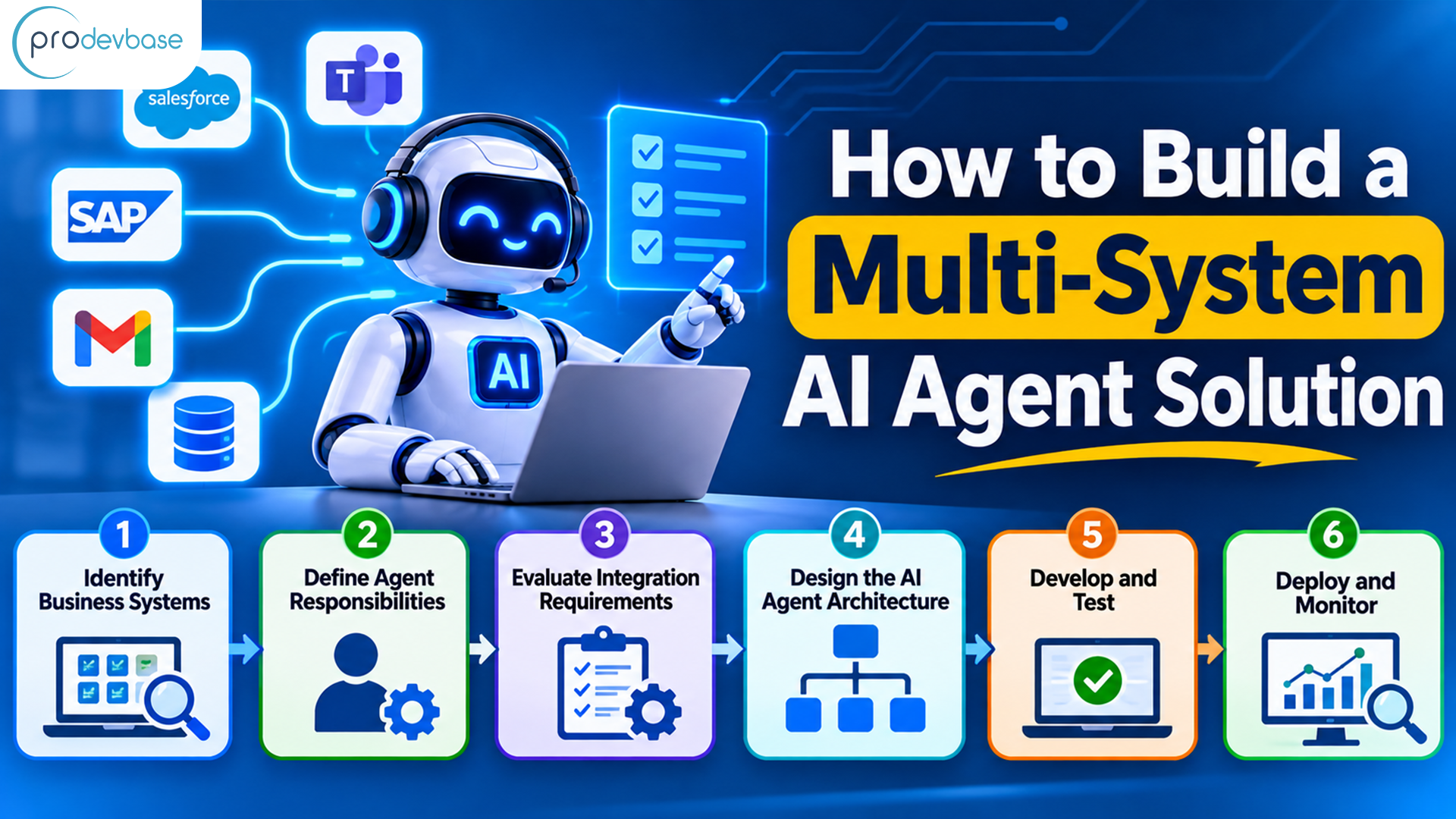
How to Build a Multi-System AI Agent Solution
Businesses should follow a structured approach when developing AI agents that connect multiple applications.
Step 1: Identify Business Systems
List the applications used across departments and identify workflows that involve repetitive manual coordination.
Step 2: Define Agent Responsibilities
Decide what each agent should do, which information it can access, and which actions require human approval.
Step 3: Evaluate Integration Requirements
Review API availability, authentication methods, data formats, and application permissions before selecting suitable integration methods.
Step 4: Design the AI Agent Architecture
Choose between a single-agent or multi-agent approach based on workflow complexity. Use an orchestration framework when multiple agents need to coordinate tasks.
Step 5: Develop and Test
Build the agents, connect the required applications, and test real-world scenarios. Validate data accuracy, error handling, security, and workflow completion.
Step 6: Deploy and Monitor
Deploy the solution gradually. Monitor task completion, integration failures, response times, and employee feedback to identify areas for improvement.
Tools and Technologies for AI Agent Integration
The technology stack depends on business requirements and existing infrastructure. Common options include:
- AI Agent Frameworks: LangGraph, AutoGen, CrewAI, and Semantic Kernel.
- AI Models: OpenAI, Anthropic Claude, Google Gemini, and Meta Llama.
- Enterprise Applications: Salesforce, SAP, Oracle, ServiceNow, and Workday.
- Cloud Platforms: AWS, Microsoft Azure, and Google Cloud.
- Data Technologies: PostgreSQL, Snowflake, and Google BigQuery.
- Deployment Tools: Docker and Kubernetes.
Selecting the right tools is important. Businesses should prioritize compatibility, security, scalability, and long-term maintenance instead of adopting unnecessary technologies.
Challenges to Consider When Connecting Business Systems With AI Agents
Although AI agents offer significant automation opportunities, businesses must address several challenges.
- Data inconsistency: Different platforms may store information in different formats. Data validation and mapping help prevent incorrect updates.
- API failures: Application downtime and authentication issues can interrupt workflows. Error handling, retries, and monitoring improve reliability.
- Security risks: Agents may access sensitive information. Role-based permissions and audit logs help control access.
- Incorrect AI actions: Agents may misunderstand requests. Structured workflows, testing, and human approval help reduce mistakes.
- Workflow complexity: Multiple agents can create difficult handoffs. Clearly defined responsibilities and orchestration rules help maintain control.
Why Choose ProDevBase for AI Agent Development?
Connecting multiple business systems requires expertise in AI development, application integration, workflow automation, and security planning.
At ProDevBase, we help businesses develop custom AI agents and multi-agent solutions that fit their operational requirements.
Our capabilities include custom AI agent development, multi-agent system architecture, intelligent workflow automation, enterprise application integration, and ongoing solution optimization.
Whether you want to connect CRM and ERP platforms, automate finance workflows, or coordinate tasks across departments, our team can help design an AI solution aligned with your business goals.
Explore our Agentic AI Development Services to learn more.
Conclusion
Connecting multiple business systems using AI agents helps organizations move beyond disconnected applications and manual workflows.
By combining secure APIs, intelligent orchestration, and clearly defined agent responsibilities, businesses can improve information sharing, automate repetitive tasks, and coordinate operations more efficiently.
The best starting point is to identify one workflow that involves multiple applications and consumes significant employee time. Once that workflow demonstrates value, businesses can gradually expand AI agent integration across other departments.
Ready to connect your business systems with AI agents? Contact ProDevBase to explore custom AI development and integration solutions for your business.