
How to Automate Business Workflows Using AI and RPA to Boost Efficiency
How to Automate End-to-End Business Workflows Using AI and RPA
Businesses handle hundreds of routine tasks every day, from processing invoices and managing customer requests to updating records and handling employee information. When these activities depend on manual work, they can slow down operations, increase errors, and take employees away from more important responsibilities. So let’s have a look at How to Automate Business Workflows Using AI and RPA.
This is where AI and Robotic Process Automation (RPA) can help. RPA handles repetitive tasks, while AI helps businesses understand information, identify patterns, and make better decisions. Together, they make it possible to automate entire business workflows rather than just individual activities.
In this guide, let’s explore how businesses can use AI and RPA to simplify everyday operations and improve productivity.
What Is End-to-End Business Workflow Automation?
End-to-end business workflow automation connects different activities into one continuous process, from receiving a request to completing the final task.
For example, when a company receives an invoice, employees usually need to open the document, check the details, match it with a purchase order, get approval, and update the accounting system.
With automation, these activities can happen through a connected workflow. AI extracts the invoice details, checks the information, and identifies possible issues. RPA then updates the relevant business applications and sends the invoice for approval.
This reduces unnecessary manual work and helps teams complete processes more consistently.
How AI and RPA Work Together
AI and RPA have different roles, but they work well together.
- AI: Understands documents, reads emails, identifies information, and supports decision-making.
- RPA: Performs repetitive actions such as entering data, updating records, and moving information between applications.
- Workflow Automation: Connects these activities and makes sure each step happens in the correct order.
For example, when a customer submits an enquiry, AI can understand the request and identify the type of service needed. RPA can then create a CRM record, assign the enquiry to the right sales representative, and send an acknowledgment email.
Instead of employees handling every step manually, the process moves forward with less intervention.
Business Processes You Can Automate Using AI and RPA
Not every business activity needs automation. It makes sense to start with processes that involve repetitive work, multiple applications, and clear business rules.
Here are some common examples.
1. Invoice and Payment Processing
Finance teams spend considerable time reviewing invoices and updating accounting records. AI can extract invoice details, identify missing information, and flag possible duplicates. RPA can match invoices with purchase orders and update accounting applications after approval.
2. Customer Support Management
AI can read incoming customer messages and identify whether they relate to billing, technical support, or order enquiries. RPA can create tickets, assign them to the appropriate team, and update customer records. Complex requests can be forwarded to employees.
3. HR and Employee Onboarding
HR teams handle documents, employee records, onboarding schedules, and internal requests. Automation can collect employee information, update HR systems, schedule orientation sessions, and send reminders.
4. Sales and Lead Management
AI can review incoming enquiries and identify potential customer requirements. RPA can create CRM entries, assign leads to sales representatives, and schedule follow-up activities. This gives sales teams more time to focus on customers.
5. Order and Inventory Management
Businesses can automate order verification, inventory updates, and shipping notifications. AI can also help identify changes in product demand and suggest when stock levels need attention.
Steps to Automate Business Workflows Using AI and RPA
A successful automation project starts with understanding existing business processes. Here are six practical steps to follow.
Step 1: Identify Repetitive Tasks
Review how different departments handle their daily activities. Look for tasks that involve repeated data entry, document processing, approvals, and switching between applications.
Step 2: Choose the Right Process
Start with one workflow that takes considerable time and has clear business requirements. Invoice processing or customer ticket management can be good starting points.
Step 3: Prepare Data and Applications
Check whether the required information is accurate and accessible. Make sure existing applications support secure connections through APIs or suitable integration tools.
Step 4: Connect AI and RPA Tools
Decide which activities require AI and which can be handled by RPA. Connect the required applications and establish how information should move between each stage.
Step 5: Set Approval and Security Rules
Not every action should happen automatically. Financial transactions, sensitive customer information, and important business decisions may require employee approval. Set clear permissions and maintain activity records.
Step 6: Test and Improve the Workflow
Test the complete process before introducing it across the organization. Monitor processing time, errors, and employee feedback. Make improvements whenever the workflow encounters problems.
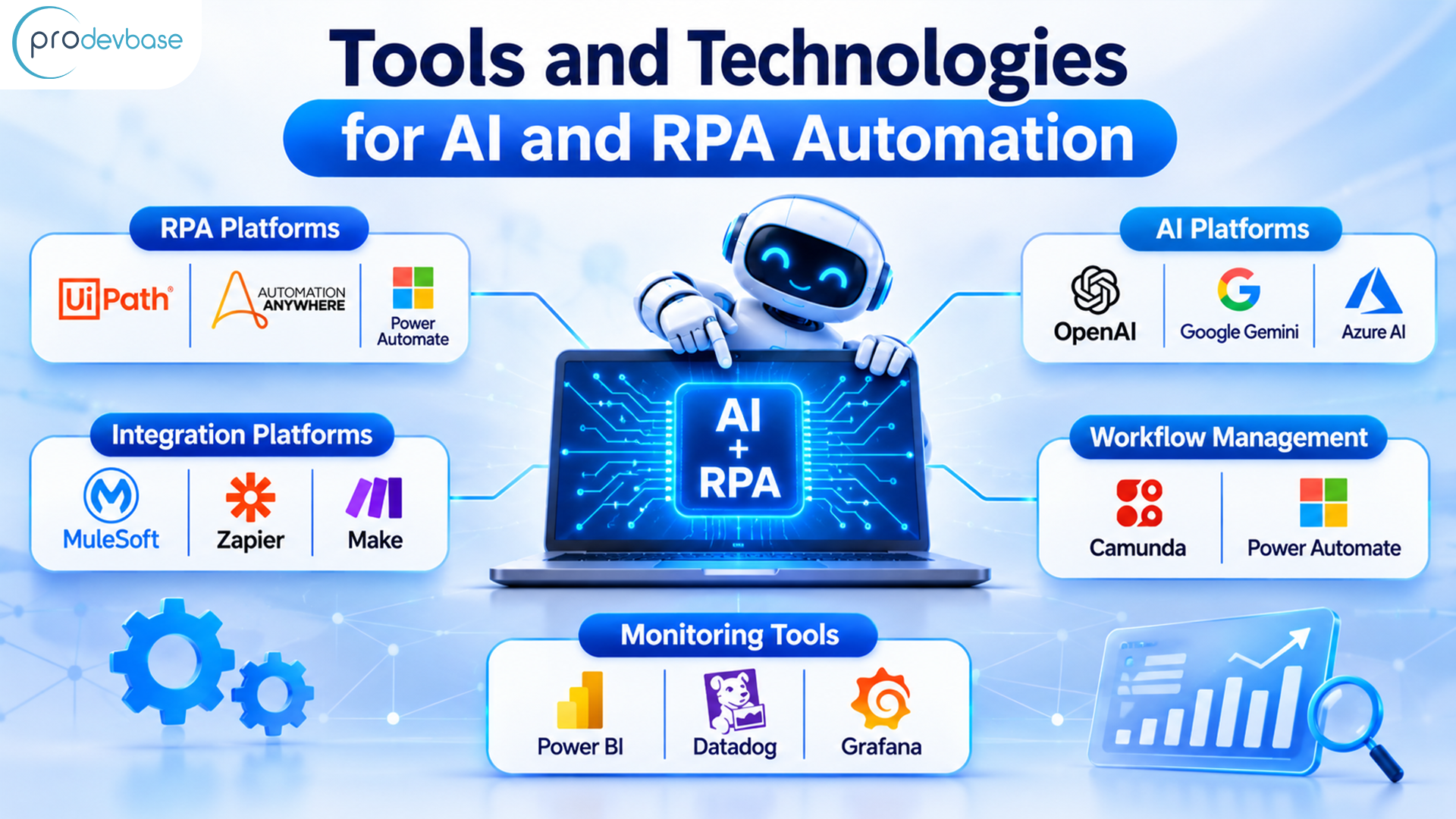
Tools and Technologies for AI and RPA Automation
Choosing suitable tools depends on the applications a business already uses and the type of work it wants to automate.
Some commonly used technologies include:
- RPA Platforms: UiPath, Automation Anywhere, and Microsoft Power Automate help automate repetitive software activities.
- AI Platforms: OpenAI, Google Gemini, and Azure AI support document understanding, information extraction, and intelligent business applications.
- Integration Platforms: MuleSoft, Zapier, and Make connect different business applications.
- Workflow Management: Camunda and Microsoft Power Automate help manage tasks, approvals, and business processes.
- Monitoring Tools: Power BI, Datadog, and Grafana help track workflow performance and identify problems.
Businesses should select tools based on their actual requirements rather than investing in technologies they may not need.
Common Challenges in Business Workflow Automation
Although automation can simplify business operations, implementation requires proper planning.
Some common challenges include:
- Poor Data Quality: Incorrect information can affect the entire workflow. Clean and validate important business data before implementation.
- Legacy Applications: Older systems may not support modern integrations. Choose suitable APIs, connectors, or RPA methods.
- Security Concerns: Protect sensitive information with access controls, secure credentials, and activity logs.
- Employee Adoption: Train employees and explain how automation will support their daily responsibilities.
- Unexpected Errors: Include human review and exception handling so that unusual situations do not stop the entire process.
Regular monitoring also helps businesses identify issues before they affect daily operations.
How Prodevbase Helps Businesses With Intelligent Automation
Every business has different operational needs. Some organizations want to reduce manual data entry, while others need to connect multiple applications or improve document processing.
Prodevbase helps businesses explore AI integration and automation solutions based on their existing systems and requirements.
Our capabilities include:
- AI Integration: Connecting AI solutions with existing business applications.
- Intelligent Automation: Combining AI, RPA, and workflow tools to simplify repetitive activities.
- Custom AI Development: Building solutions for document processing, data extraction, and business-specific requirements.
- System Integration: Connecting CRM, ERP, finance, and other enterprise applications.
- Workflow Optimization: Identifying process bottlenecks and improving business operations.
Our focus is on building practical solutions that fit existing business processes and support long-term growth.
Ready to Automate Your Business Workflows?
Automating business workflows is about making everyday operations easier, faster, and more consistent. By combining AI with RPA, businesses can reduce repetitive work, connect applications, and give employees more time to focus on important responsibilities.
The best approach is to start with one process, understand its challenges, and gradually expand automation as the results improve.
Prodevbase helps businesses build intelligent automation solutions that connect systems and simplify operations. Contact our team to discuss your requirements and explore the right automation approach for your business.
Conclusion
AI and RPA are helping businesses move beyond manual processes and disconnected applications. From invoice processing and customer support to sales and HR operations, these technologies can simplify activities across different departments.
However, successful automation depends on choosing the right processes, preparing reliable data, maintaining security, and monitoring results. With the right approach, businesses can build connected workflows that save time, reduce errors, and support future growth.